MELSEC iQ-R — PLC-side settings
MELSEC iQ-R — built-in Ethernet port (CPU module).
What you need
- Configuration tool: GX Works3
- Network: Align IP address, subnet mask, and default gateway with your network environment.
- After configuration: Power cycle the PLC to apply the new parameters.
Example values used in this guide
| Parameter | Example value | Notes |
|---|---|---|
| IP address | 192.168.250.100 |
Adapt to your network |
| TCP port | 1025 |
SLMP TCP |
| UDP port | 1035 |
SLMP UDP |
PLC-side settings
Screen: Unit parameters
| Parameter | Setting |
|---|---|
| IP Address | 192.168.250.100 (example) |
| Subnet Mask | Match your network |
| Default Gateway | Match your network |
| Write Permission During RUN | Permit all (SLMP) |
| Communication Data Code | Binary |
| Open Method Setting | Do not open via program |
Screen: Remote device connection settings
| Parameter | TCP | UDP |
|---|---|---|
| Communication Method | SLMP | SLMP |
| Protocol | TCP | UDP |
| Port Number | 1025 |
1035 |
| Keep-Alive | Enabled | UDP |
Connecting with this library
| Parameter | Value |
|---|---|
| Canonical profile | melsec:iq-r |
| Port (TCP) | 1025 |
| Port (UDP) | 1035 |
Code example:
import asyncio

from slmp import SlmpConnectionOptions, SlmpTarget, open_and_connect, read_typed


async def main() -> None:
    options = SlmpConnectionOptions(
        host="192.168.250.100",
        port=1025,
        transport="tcp",
        plc_profile="melsec:iq-r",
        default_target=SlmpTarget(network=0, station=0xFF, module_io=0x03FF, multidrop=0),
    )
    async with await open_and_connect(options) as client:
        value = await read_typed(client, "D100", "U")
        print(f"D100={value}")


asyncio.run(main())
using PlcComm.Slmp;

var options = new SlmpConnectionOptions(
    "192.168.250.100", SlmpPlcProfile.IqR, 1025,
    SlmpTransportMode.Tcp, SlmpTargetAddress.OwnStation);
await using var client = await SlmpClientFactory.OpenAndConnectAsync(options);
var value = await client.ReadTypedAsync("D100", "U");
Console.WriteLine($"D100={value}");
The PLC-side settings on this page apply to every language. For Rust, C++ (Arduino/PlatformIO), and Node-RED, start from each library's Getting started.
Multi-CPU CPU-buffer target
U3E0\HG... through U3E3\HG... are qualified iQ-R CPU-buffer device
routes. The qualified device and the SLMP request destination are independent
fields. Cross-CPU reads can therefore be intentional and must not be rejected
merely because those fields name different CPUs.
When a write must be reflected in CPU No. n, explicitly select both
U3En\HG... and request-target module I/O 0x03En. A write sent to another
CPU or Own Station can return a normal end code without changing the intended
CPU buffer. The libraries do not infer or change the request target from the
qualified device, retry another CPU, perform an automatic readback, or resend
when a value does not appear. Target selection remains an application decision.
Related SLMP docs
Screenshots
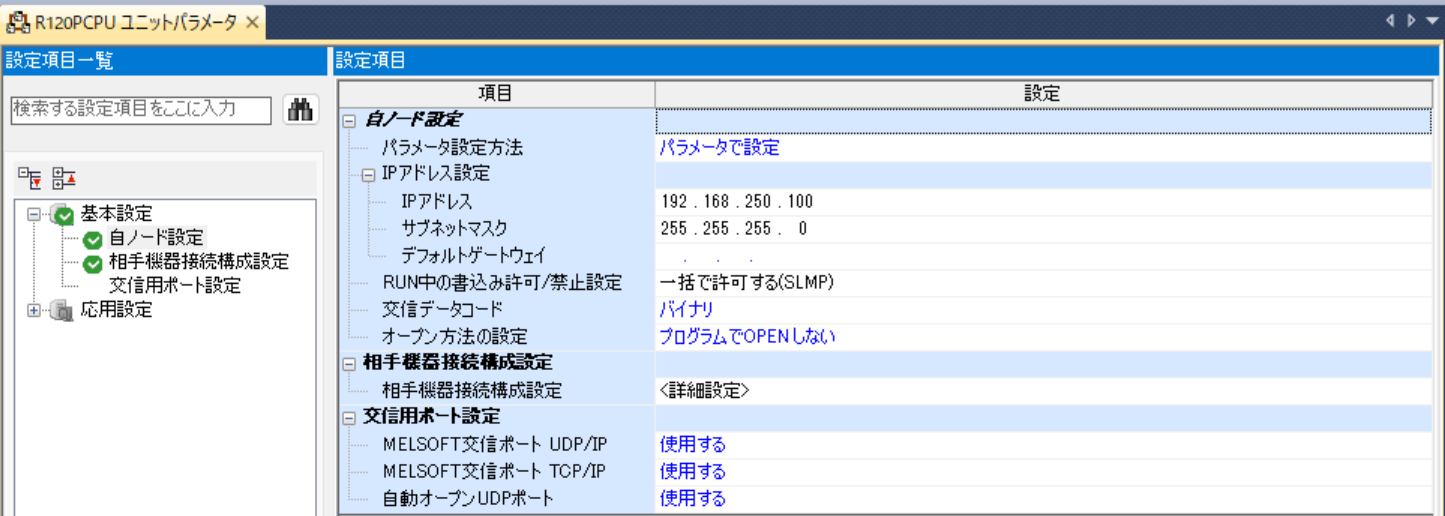 Unit parameters screen for the built-in Ethernet port.
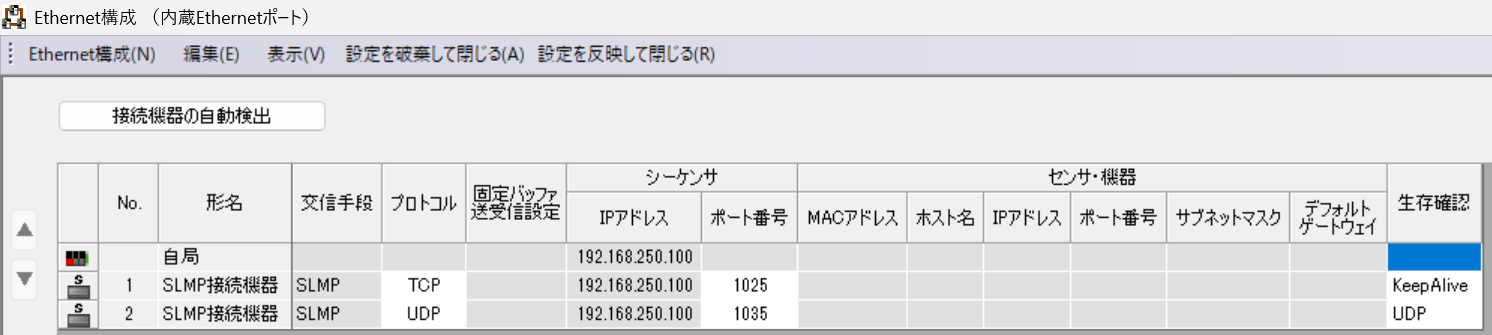 Remote device connection settings for SLMP communication.