KEYENCE KV-8000 — PLC-side settings
KEYENCE KV-8000 — built-in Ethernet port.
What you need
- Configuration tool: KV Studio
- Network: Align IP address, subnet mask, and default gateway with your network environment.
- After configuration: Power cycle the PLC to apply the new parameters.
Example values used in this guide
| Parameter | Example value | Notes |
|---|---|---|
| IP address | 192.168.250.100 |
Adapt to your network |
| Port | 8501 |
Upper Link default |
PLC-side settings
Screen: Unit settings
| Parameter | Setting |
|---|---|
| IP Address | 192.168.250.100 (example) |
| Subnet Mask | Match your network |
| Upper Link Communication | Enabled |
| Port Number | 8501 |
Full feature support
KV-8000 supports timer/counter preset writes (WS/WSS commands) and AT device access.
Connecting with this library
| Parameter | Value |
|---|---|
| Canonical profile | keyence:kv-8000 |
| Port (TCP) | 8501 |
| Port (UDP) | 8501 |
Pass the canonical profile explicitly. The standard connection helpers do not infer it from the PLC.
Code example:
import asyncio

from hostlink import HostLinkConnectionOptions, open_and_connect, read_typed


async def main() -> None:
    options = HostLinkConnectionOptions(
        host="192.168.250.100",
        plc_profile="keyence:kv-8000",
        port=8501,
        transport="tcp",
    )
    async with await open_and_connect(options) as client:
        dm0 = await read_typed(client, "DM0", "U")
        print(f"DM0={dm0}")


asyncio.run(main())
using PlcComm.KvHostLink;

var options = new KvHostLinkConnectionOptions(
    "192.168.250.100", 8501, HostLinkTransportMode.Tcp, "keyence:kv-8000");
await using var client = await KvHostLinkClientFactory.OpenAndConnectAsync(options);
var dm0 = await client.ReadTypedAsync("DM0", "U");
Console.WriteLine($"DM0={dm0}");
The PLC-side settings on this page apply to every language. For Rust and Node-RED, start from each library's Getting started.
Screenshots
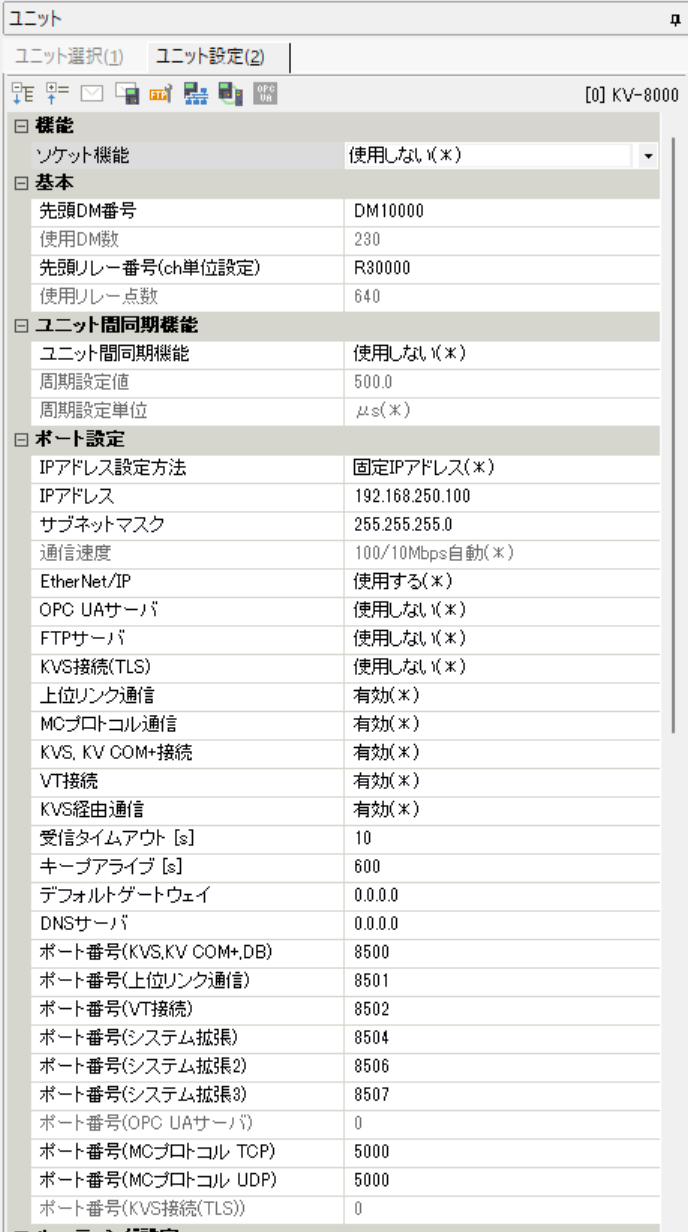 KV-8000 unit settings screen for upper link communication.